In this Article
Golf simulators promise real numbers on your swing, but how close are they to the truth? Here's what actually drives simulator accuracy, and where the numbers can mislead you.
If you’ve ever hit a 7-iron into a simulator screen and watched it read out 172 yards, then wondered whether that number would hold up on an actual course, you’re asking the right question. How accurate are golf simulators, really? After seven years of teaching golfers who train indoors all winter here in Chicago, I can tell you the honest answer isn’t a single percentage. It depends heavily on which technology is inside the box, how the room is set up, and what you’re actually trying to measure.
Some simulators are accurate enough that touring pros use the exact same units to fit clubs and verify swing changes. Others are closer to a fun approximation that happens to look impressive on a screen. Knowing the difference will save you from either trusting bad numbers or dismissing a system that’s actually telling you something real.
Table of Contents
How Golf Simulators Actually Track Your Swing
Every golf simulator accuracy claim starts with the same question: what is the unit actually measuring, and how? There are three basic technologies, and they are not interchangeable.
Radar-Based (Doppler) Systems
Radar units, the technology behind TrackMan and similar professional-grade launch monitors, send out a continuous microwave signal and track the golf ball through its actual flight path. Because they follow the ball rather than guessing from impact conditions alone, they’re especially strong at longer clubs and full shots where ball flight has room to develop.
Radar systems generally want more room behind and above the ball to get a clean read, which is why some indoor installs place the unit further back or overhead rather than right next to your feet.
Camera-Based (Photometric) Systems
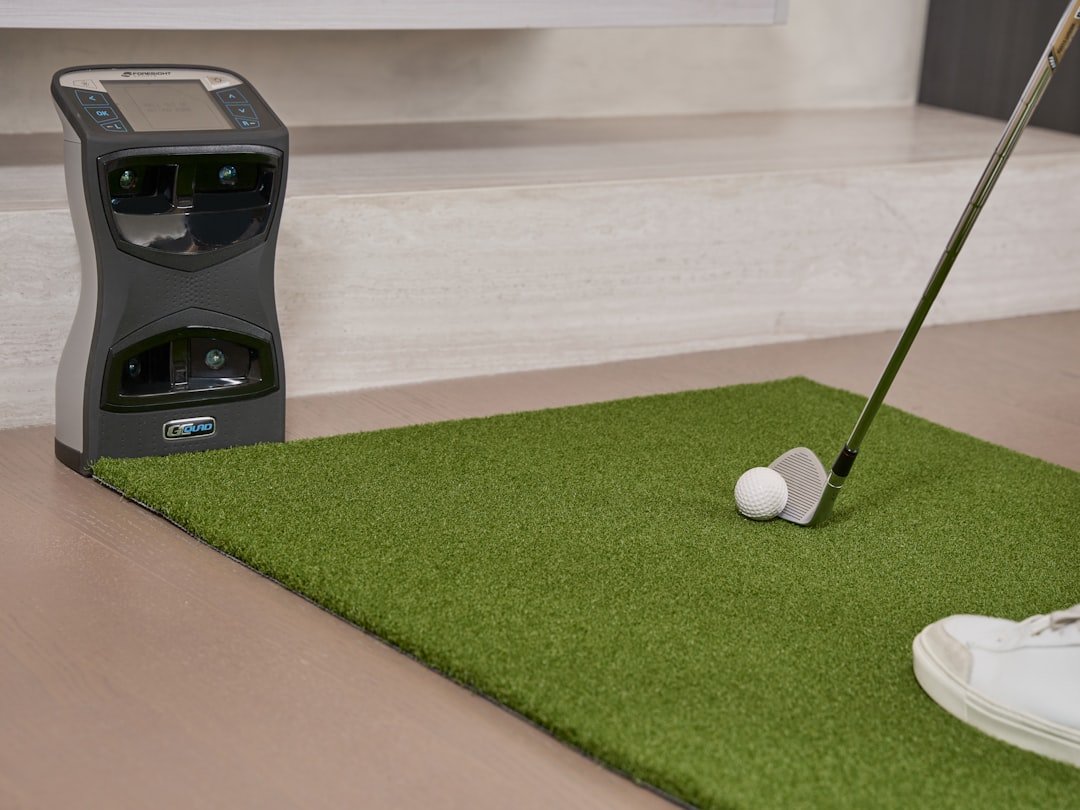
Camera-based systems, like Foresight’s GC and Uneekor’s Eye units, use high-speed cameras positioned near the ball to capture club and ball data in the few milliseconds around impact. Instead of tracking the whole flight, they calculate the rest of the trajectory using physics models built from that impact data.
This approach tends to shine in tighter indoor spaces since the cameras don’t need long sightlines, and it’s typically excellent for short-game and wedge work where impact conditions matter more than watching the ball travel 250 yards.
Infrared and Entry-Level Systems
Budget and entry-level units often rely on infrared sensor arrays or simplified camera setups that capture fewer data points, sometimes 8 to 12 metrics compared to the 20-plus a premium dual-tracking system records. They’re genuinely useful for practice feedback and casual play, but they’re built to a different price point and a different accuracy standard, and it shows most in edge cases like mishits, low-loft clubs, and very high or low spin shots.
So How Accurate Are Golf Simulators in Practice?
Here’s the part golfers actually want to know. On a properly calibrated, premium simulator (the TrackMan and Foresight tier), independent testing has generally found ball speed, launch angle, and carry distance land within about 1 to 3 percent of real-world values, and club path and face angle are typically captured to within fractions of a degree. That’s tight enough that PGA Tour players use these same units for club fitting and swing verification, not just entertainment.
Mid-range simulators, the kind you’ll find in a lot of home builds and smaller golf training centers, trade some of that precision for a much lower price tag. They still track the core numbers, ball speed, spin, launch angle, but with a wider margin of error and fewer secondary metrics. Entry-level and budget units are the most variable of the bunch. Some do a surprisingly good job on ball speed and distance while struggling with spin rate, which is one of the hardest numbers to measure accurately without dual radar-and-camera tracking.
The honest summary: a golf simulator’s accuracy is really a spectrum tied directly to its underlying technology and price point, not a single industry-wide number. If you want a deeper look at how different systems stack up, MyGolfSpy’s lab-tested launch monitor guide is one of the few independent, non-manufacturer sources that actually puts units through controlled testing rather than repeating marketing claims. TrackMan’s own technical specifications page is also worth a look if you want to see exactly which metrics a professional-grade system is built to capture.
What Throws Off a Simulator’s Numbers
Even a genuinely accurate golf simulator will spit out bad data if the setup around it is off. In my experience, most of the “this thing is lying to me” complaints trace back to one of these:
Calibration drift. Sensors and cameras can shift out of alignment over weeks of use, especially with portable units that get packed up and moved. A quick recalibration, usually built into the software, should be part of your regular maintenance, not something you only think about when the numbers look wrong.
Room dimensions. Radar-based systems in particular want real space to work with, typically a minimum of about 10 feet of ceiling height and 15 feet of depth from the ball to the screen. Cramped garages and low-ceiling basements are a common reason home simulator owners see inflated launch angles or clipped carry numbers.
Hitting mat and ball quality. A worn-out mat with dead flex reads differently than a fresh one, and cheap range balls or limited-flight balls simply don’t produce the same spin and compression as a premium ball. If you’re testing a specific yardage gap, use the same ball model you’d actually play.
Lighting, for camera systems. Photometric units need consistent, even lighting to get a clean read on the ball and clubface. Flickering fluorescent lights or a bright window glare behind the hitting area can quietly degrade accuracy without ever throwing an obvious error.
Simulator Numbers vs. the Real Course
This is where a lot of golfers get tripped up, and it’s less about the technology being wrong and more about comparing two different things. A simulator’s carry distance can be extremely accurate and still not match what you see on the course, because total distance on grass includes roll, which depends on turf firmness, moisture, and slope that a hitting bay simply can’t replicate unless the software specifically models it.
Wind is the other big variable. Unless your simulator software includes a wind and weather setting (most premium platforms do), you’re hitting in a permanent dead-calm, sea-level environment. That 150-yard 7-iron on a still simulator screen might be a 140-yard club into a two-club wind on an actual course, and neither number is “wrong.” They’re just answering different questions.
None of this means simulator data is unreliable. It means the smart way to use it is to trust the swing mechanics, club path, face angle, attack angle, spin axis, and treat exact carry yardage as a useful estimate rather than gospel, especially on anything short of a top-tier calibrated setup.

Are Golf Simulators Accurate Enough to Actually Help You Improve?
Yes, and this is the part that matters more than the yardage debate. Even a mid-tier simulator that isn’t dead-on for absolute carry distance is still extremely useful for tracking trends over dozens or hundreds of swings, which is exactly how real improvement happens. If your club path number is consistently 4 degrees out-to-in every session for a month, that’s meaningful information regardless of whether your carry distance is off by five yards.
I have students who use simulator sessions specifically to chase swing speed gains over a winter, and the session-to-session consistency of a decent launch monitor is more than good enough for that kind of tracking, even on a system that wouldn’t pass a lab-grade accuracy test. If your goal looks something like the training plan in our guide to reaching 120 mph swing speed, a simulator is one of the best tools you have for confirming the work is actually paying off, week over week, without needing to book range time in the snow.
The mistake is treating a single shot’s readout as the final word. Look at clusters of ten or twenty swings, watch the trend, and let the technology do what it’s actually good at.
Getting More Accurate Data From Your Own Sessions
A few habits noticeably improve the reliability of whatever simulator you’re using, expensive or not:
Recalibrate on the schedule your manufacturer recommends, not just when something looks obviously wrong. Drift is often gradual enough that you won’t notice it happening in real time.
Check your setup and stance before you blame the machine. A surprising amount of “bad data” is actually a bad swing or a mis-aimed setup that the simulator is faithfully recording. If your numbers look inconsistent shot to shot, it’s worth ruling out your own alignment before you assume the sensor is at fault, and a set of alignment aids can help you confirm you’re actually squared up before you start collecting data you plan to trust.
Use consistent, quality golf balls for anything you’re measuring seriously, and replace a worn hitting mat before it starts affecting your strike quality.
Give camera-based systems clean, even lighting, and give radar-based systems the room depth they’re designed for. Both technologies are only as good as the environment you put them in.
Frequently Asked Questions
How accurate are golf simulators compared to real golf?
Premium, properly calibrated simulators typically land within 1 to 3 percent of real-world ball speed, launch angle, and carry distance, which is close enough that tour players use them for fitting and swing work. Budget units are usable for practice feedback but carry a wider margin of error, especially on spin rate.
Are golf simulators accurate enough to determine my real handicap?
Not directly. Most simulator software can estimate a score based on your shot data, but it can’t fully account for course conditions, pressure, and the short game variables of real turf, so treat any simulator-based handicap as a rough estimate rather than an official number.
Do golf simulators mess up your swing over time?
Not the technology itself, but hitting off a mat exclusively for months without any grass or uneven-lie practice can leave gaps in shot-shaping and trajectory control that only show up once you’re back on a real course. Simulators are a strong supplement, not a full replacement for outdoor reps.
What’s the most accurate golf simulator for home use?
Dual-tracking systems that combine radar and camera data, like higher-end TrackMan and Uneekor models, are generally considered the most accurate for home installs, though they come at a significant price premium over single-technology units.
Why do my simulator numbers not match what I hit on the course?
Usually a mix of missing roll distance, no wind or elevation modeling, a different ball than you play outdoors, or a room that’s too tight for the sensor’s ideal setup. None of these mean the unit is broken, they just mean it’s measuring a controlled environment instead of an outdoor one.
Can golf simulators account for wind and elevation?
Many premium simulator software packages let you dial in wind speed, direction, and even course elevation for a more realistic playing experience, but the launch monitor itself is still reading your indoor shot in still air. The software is adjusting the display, not changing what the sensor measured.
The Bottom Line
Golf simulators are far more accurate than most golfers give them credit for, provided you’re using a well-calibrated system in a properly set-up space and reading the right numbers. Trust the trends in your swing data over any single shot’s yardage, keep your equipment and environment in good shape, and a simulator becomes one of the most useful tools you can add to your game, especially through a long Chicago winter when the course isn’t an option anyway.